Financial Aid in Workday
After you fill out your FAFSA, you'll receive a Financial Aid offer. You'll review and approve this offer in Workday.
Grants (such as federal aid) and scholarships will be applied to your account automatically. If you are offered a student loan, you can either accept the loan, decline it, or write it down to a lower amount.
To review your financial aid offer:
- Log in to Workday.
- Click the Financials Hub icon.
- Click on the Financial Aid tab on the left.
- Click “View Financial Aid” and pick the current Award Year (2026-2027), and then click “OK.”
- Your total estimated aid is at the top. Scroll down to the Financial Aid Overview to see your aid by semester.
- You can print your offer letter and college financing plan from this page as well.
If you need help with Financial Aid, please contact us at Student Central or check out our Financial Aid FAQ for troubleshooting tips.
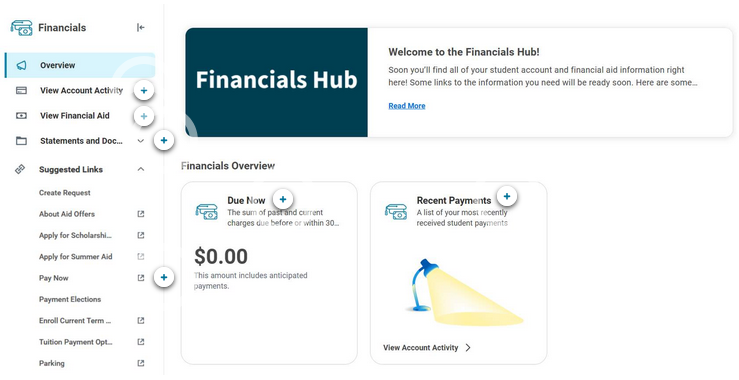
Interactive Workday Guide
Get to know Workday with this interactive guide. Scroll down to see the Financial Hub, where you'll manage Financial Aid.
"View Financial Aid" Screen
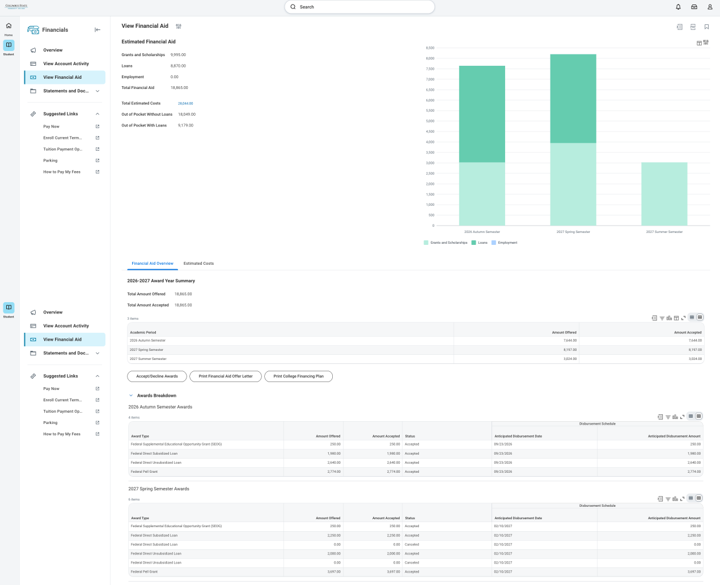
Estimated Financial Aid: A breakdown of your total financial aid offer for the entire academic year.
PRO TIP: The actual amount of aid you receive per semester is adjusted based on how many
credit hours you enroll in. If you change your schedule, your aid may change too.
Grants and Scholarships: Money for college that you don’t have to pay back.
Loans: Funds for college you borrow and repay after graduation.
Employment: Federal Work Study
Total Estimated Costs: THIS IS NOT YOUR BILL! This number is an estimate of your direct (tuition and fees) and indirect (living expenses) college costs. We’re required by law to provide this cost of attendance estimate, but your actual costs may be very different depending on your circumstances.
Accept/Decline Awards: Click this button to accept, adjust or decline any student loans you’ve been offered.
PRO TIP: Grants and scholarships are automatically accepted. Loans must be accepted, with
Entrance Counseling and Master Promissory Note completed (if required), before they
can apply to your bill.
Awards Breakdown: See how your financial aid is broken out by semester
Print Financial Aid Offer Letter: Generates a printable PDF of your financial aid offer letter. The letter will automatically update if your aid is adjusted due to additional scholarships or registration changes.
Anticipated Disbursement Date: An estimate of when your financial aid will be applied to your tuition and fees. Financial aid will be paid out after the semester begins and your instructors verify your participation. Your anticipated financial aid protects your class schedule from being dropped on the fee payment deadline and provides bookstore credit if you have enough funds.