Applying for Program Completion
Columbus State Community College students who are seeking to earn the Associate of Arts, Associate of Science, Associate of Applied Science, Associate of Technical Studies, or the Bachelor of Science, Nursing (AA, AS, AAS, ATS, or BSN) are required to apply for program completion (graduation) in order to have their academic progress evaluated and approved for degree award and participate in our Commencement ceremony.
Students will apply for program completion in Workday by the stated deadline for the semester in which they will complete their degree program. Only students who have completed at least 45 credit hours will be able to access the application on Workday.
Students who are only in a certificate program or who are completing only a certificate program, and not their degree, in the current semester do not need to apply for program completion. The APC is only for students who are completing a degree program at CSCC.
Please see the checklist below for further instructions for completing your application.
Important Dates – Application for Program Completion
| Semester | Completion Date | Application Available | Application Closed |
|---|---|---|---|
| Autumn 2026 | December 19, 2026 | August 31, 2026 | November 20, 2026 |
| Spring 2027 | May 15, 2027 | January 18, 2027 | April 16, 2027 |
| Summer 2027 | August 13, 2027 | May 31, 2027 | July 23, 2027 |
Prior to Application
- Review your academic progress toward your degree in Workday using your Academic Progress Report or "APR". Plan to complete any remaining requirements in the semester you wish to graduate.
- Schedule a meeting with your academic or faculty advisor. While not required for your application for program completion, it is highly recommended that you review your APR and final degree requirements with them prior to application for program completion.
Submitting Your Application for Program Completion (APC)

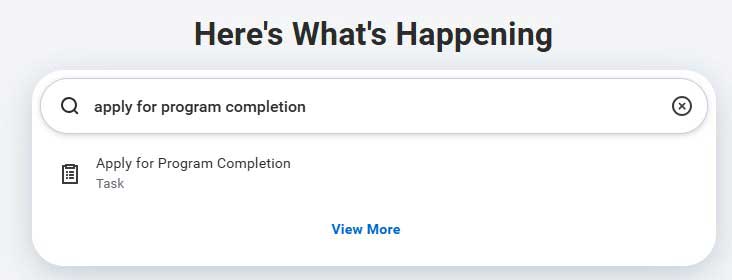
- To complete your APC, you will need to log into your Workday account. From any page in Workday, you will type “Apply for Program Completion” in the search/task bar:
- Launch the task by clicking on it.
- Ensure that the correct academic record is selected at the top of the screen.
- Name is correct- this is your Legal Name. If you want a different name on your diploma, you will have an opportunity to create a “Diploma Name” after your application is submitted.
- Address is correct- this is your preferred primary address on Workday. If you want to send your diploma to a different address, you will have an opportunity to create a “Diploma Address” after your application is submitted.
- The Program of Study is correct. If not, you will need to change it first through Student Central, your academic advisor, or the Telephone Information Center (TIC).
- Check the RSVP for Commencement box if you wish to attend and receive information regarding the Commencement ceremony. You are not obligated to attend if you check "Yes". If you are unsure about attending, please choose "Yes". Leave unchecked if you do not wish to attend.
- Check the box indicating the primary program of study (Certificates are not a primary program of study and this application is only for students seeking degrees. If you check the certificate box, nothing will happen. Certificates are awarded separately).
- Click on the drop down menu for the "Anticipated Academic Period for Completion" and select the "CSCC Academic Calendar", then the appropriate academic year (example: 2026-2027) and then the only available semester for completion (only the current semester is available).
- Confirm the accuracy of your answers in the application.
- Click "Confirm".
- Click "Submit" and then "Done" to return to your Workday homepage. Once completed, the student has successfully applied for program completion or graduation in Workday. You will now received several tasks in your Workday inbox. Please see below for further instructions.
After You Submit Your Application
- You will receive the following TO-DO tasks in your inbox on Workday:
- Questionnaire regarding Commencement- if you checked the RSVP box on your application, you will get a questionnaire to your inbox and you will need to affirm your desire to attend and list any special accommodations needed for you and/or your guests for the ceremony. If no accommodations needed, write, “NONE,” in the box and click submit.
- Add a Diploma Name – follow the prompts in the TO DO to add a diploma name. Once the name is added return to the TO DO and click submit. If no changes are needed, just click submit.
- Add a Diploma Address- if you wish to send your diploma to an address other than your primary address, you may add it by following the prompts in the TO DO. Once you have added the address, return to the TO DO and click submit.
- Once all these tasks are completed, you will receive an email and Workday notification regarding Commencement if you RSVP’d “yes” or confirmation we have received your application if you RSVP’d “no.”
- You will also receive the following notifications and/or emails to your Workday “bell”
and/or your CSCC student email:
- Confirmation we have received your APC and your RSVP status.
- Initial Denial Email- sent midway through the semester to those students who are missing requirements and do not have any in progress courses for the current semester to meet those requirements.
- Commencement Ceremony information- this email will be sent to all students who RSVP’d yes on their APC.
- Congratulations email- sent to all students upon the conclusion of the semester who successfully met all requirements for graduation.
- Denial email- sent to those students who upon the conclusion of the semester still had outstanding degree requirements. You will need to apply for program completion in a future semester.
- END OF SEMESTER- Students do not need to attend the Commencement ceremony to receive their diplomas.
If a student is cleared for completion, they can order a transcript as soon as their
degree program is listed as “COMPLETE” in the overview in their Academics tab on Workday.
Transcripts can be ordered through Parchment at the link on this page:
- Diplomas will arrive at the student’s preferred address (Primary or diploma) in about 10 weeks following the conclusion of the semester.
Latin Honors
Students eligibility for Latin Honors is determined at two different points. For honors that are posted in the Commencement Ceremony program, a student's overall GPA at the end of the prior semester is used to determine the honor and eligibility to wear the honors cord for the ceremony and inclusion of the honor in the program. For the degree itself and the final transcript, a student's overall GPA with all grades submitted at the end of the final semester will determine the honor.
Cum Laude- Students who earn an overall GPA of 3.5 to 3.799
Magna Cum Laude- Students who earn an overall GPA 3.75 to 3.949
Summa Cum Laude- Student who earn an overall GPA of 3.95 to 4.0
Troubleshooting Submission Errors
If you receive a submission error after step 8 in the “Submitting your Application Program Completion” section above, click on the error and read the information in the box. This explains why you are unable to submit your APC. Please contact your academic advisor or email graduation@cscc.edu.
Questions?
Please direct questions regarding your course work and academic progress to your assigned academic or faculty advisor.
All other questions regarding the application for program completion or commencement
should be directed to the Graduation Verification Office graduation@cscc.edu