Blackboard & Ally
Ally is an accessibility tool integrated with the Blackboard Learning Management System (LMS). It helps improve the accessibility of course content by automatically creating alternative formats of documents, providing instructors with feedback on accessibility issues, and offering step-by-step guidance for making improvements. Accessible Media encourages instructors to use Ally as a guide to improve accessibility and create more inclusive and accessible learning environments.
Blackboard Inclusive Learning Experiences
Ready to get started?
Ally for LMS Help for Instructors - Use the Quick Start and other information to improve the accessibility of your course content.
Blackboard Ultra Accessibility Overview - Learn about Ultra-specific accessibility information.
Formatting Content Items in the Blackboard Content Editor - YouTube
Blackboard Ally Course Accessibility Report - Generate your own Course Accessibility Report to see issues in your class.
Blackboard - Extra Time Versus Time Limit Accommodation and Other Assessment Exceptions
Learn the difference between "extra time" and "time limit accommodation", how to set access dates, and change attempt exceptions in Ultra. If you have further questions, please contact the Faculty Assistance Center (FAC).
- “Extra Time” applies to everyone on the roster.
- It has been confirmed that if Extra Time is set for a student who also has a Time Limit Accommodation set the extra time is also doubled (which is the appropriate way to handle the situation.)
- Please note that if you choose to add Extra Time to your exams for the entire roster, you will need to report the full time allowance (test time + extra time) to the Testing Center for seat booking to be accurate in RegisterBlast.
- “Time Limit Accommodation” only applies to and is individually set for students registered
with Accessibility Services and approved for double time on tests/quizzes.
- Double-time accommodations are automatically factored into the Registerblast process based on the time limit reported for the exam overall.
Instructors can provide extra time for all students after the time limit expires. This allows students to continue working before the test is automatically saved and submitted.
- Click on Assessment Settings (gear)
- Scroll down to Time Limit
- Add desired time in minutes
- Choose an option from Submission Rules.
-
- Work is automatically saved and submitted when time expires.
- This saves and submits exam at time limit entered above
- Participants have extra time to work after the time limit expires
- This allows a pre-set amount of extra time to be added
- When initial time expires, tell participants that work submitted after the initial time limit may receive partial credit.
- Three preset options become available to add extra time for all testers (50%, 100% or unlimited)
- Work is automatically saved and submitted when time expires.
- When saved, both times show in the Assessment Settings menu
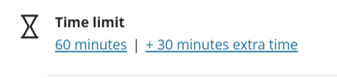
See Time Limit for more information.
Instructors can provide a double-time accommodation for students registered with Accessibility Services who have an approved double-time accommodation. This accommodation is added to the student in the Blackboard Roster. The extra time percentage should be set to 100%. The accommodation applies to all timed assessments.
Note: If Extra Time is set on the assessment for all students, the student who also has a Time Limit Accommodation set for double time has their extra time doubled (which is the appropriate way to handle the situation).
- Click on Roster
- Locate the accommodated student
- Click on the triple-dot icon next to their name
- Choose Accommodations from the drop-down
- Check Time limit accommodation
- Choose Custom percentage
- Set to 100% to double standard test time
- Click Save
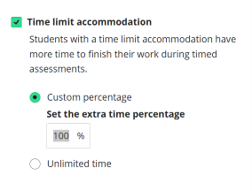
See Accommodations for more information.
Instructors can provide an exception for students who may need to test outside of the original window. The exception is added to the student's assessment in the Gradebook.
- Click on Gradebook
- Locate the student’s assessment cell
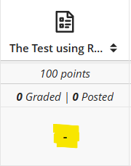
- Click on the cell to display the options and choose “Add or edit exceptions”
- Change the due date, access dates, and/or number of attempts for that student.
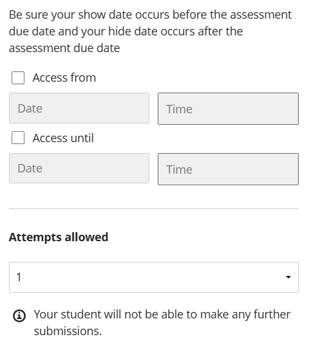
See Grant Exceptions and Exemptions for more information.
General Accessibility Information
- Blackboard is structured in a way that is accessible to students using screen readers, allowing them to navigate the site using keyboard commands. Issues arise when the content added to Blackboard is not accessible. Use Ally to ensure uploaded content is accessible by striving for green gauges.
- The accessibility of the Alternative Formats generated via Ally are only as good as the accessibility of the original content posted. Usable Alternative Format output is only successful when the Ally gauge is green.
- Supplemental materials added to Blackboard or distributed in class must also be accessible. Just because it may not be mandatory to view or read does not mean it can be posted in an inaccessible format.