Virtual desktop changes to MFA and securing student access
Update | Monday, April 21, 2025
Starting on Wednesday, April 23, Columbus State will change the way employees connect to the Horizon Virtual Desktop environment using Duo multi-factor authentication (MFA).
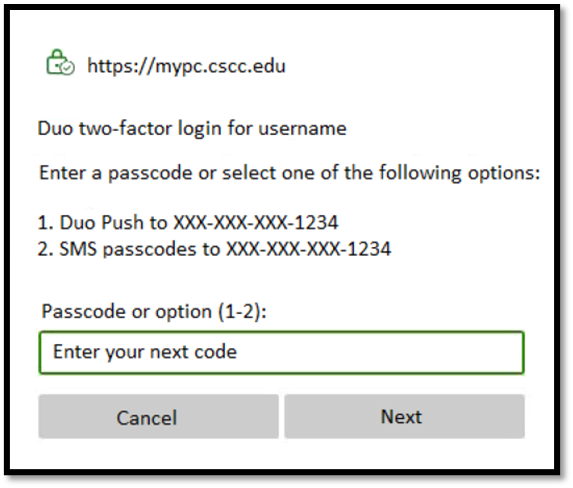
From that date on, when connecting to the virtual desktop, instead of a Duo Push automatically being sent to your device, MFA will prompt you to enter your MFA authentication method. (See sample screenshot below.) “Duo Push” is the recommended option. However, SMS or passcodes will be made available as other authentication options.
Click here to learn how to install and enable the Duo Mobile App. (If you are already using the Duo App, you do not need to download it again after the virtual desktop changes.)
Click here to learn more about Virtual Desktop environment.
Additionally, in mid-May, during the semester break, the college will begin securing student off-campus remote access to the virtual desktop using Duo multi-factor authentication.
If you have questions or need assistance, the IT Support Center can be reached at 614-287-5050, by email at helpdesk@cscc.edu, or by submitting a request at www.cscc.edu/ithelp.
Sample screenshot of the new prompt
Go to 2025 Update Archive Go to Employee Update
Latest Update Stories